Logistics operations platform

Simplify every shipment. Automate your logistics operations.

Manage shipments, process customer invoices, label and track every box, coordinate deliveries, capture proof of delivery and see your operation clearly — in one connected platform.

Built to help logistics teams reduce manual work, improve shipment visibility and manage operations more efficiently.

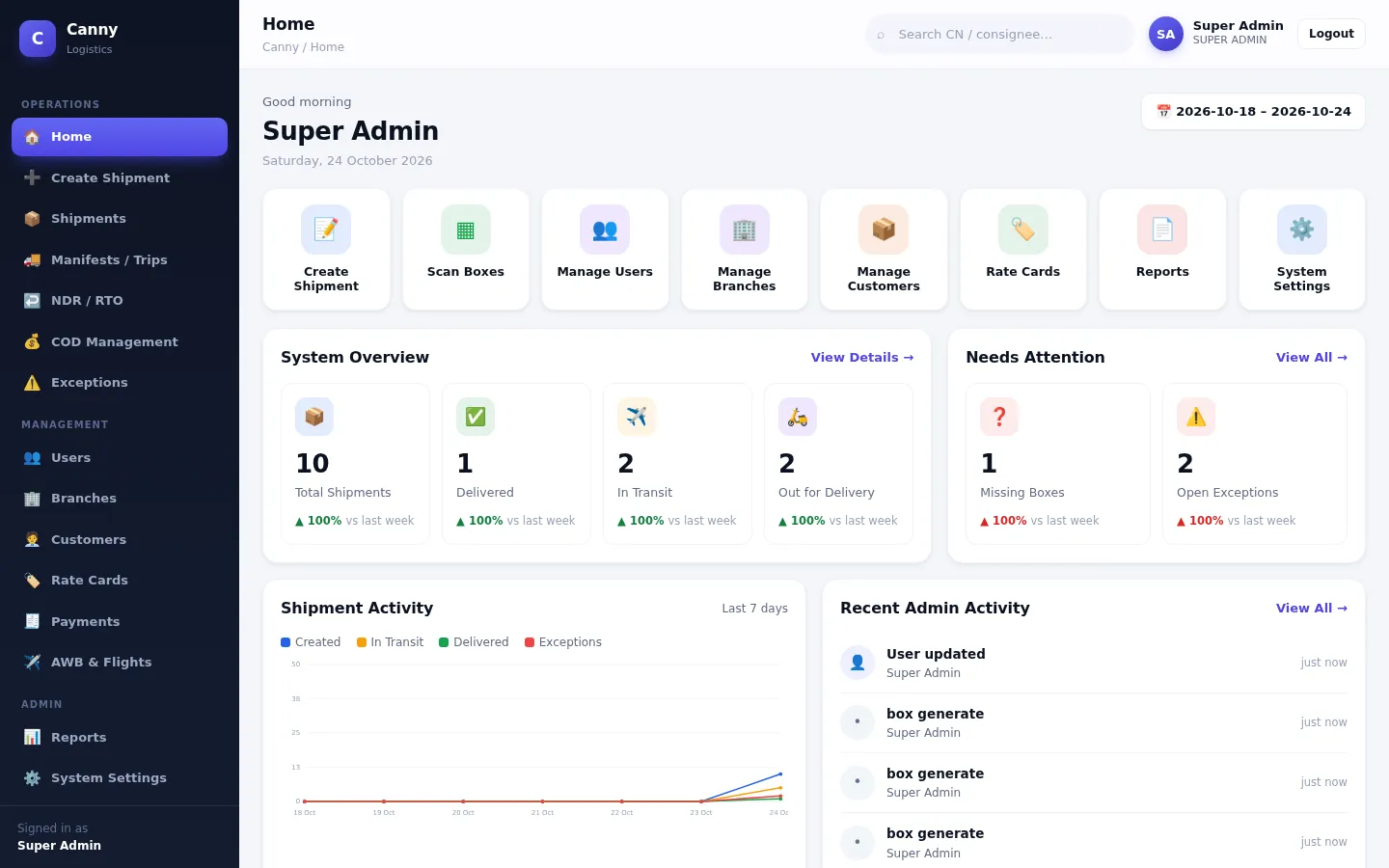
Canny Logistics home dashboard showing shipment totals, in-transit and out-for-delivery counts, missing boxes, open exceptions and a 7-day activity chart

Actual product screen, shown with demo data.

Product overview

From customer invoice to proof of delivery, one connected record

Canny Logistics follows a shipment through every stage your team handles. Information captured once at the start travels with the shipment, so nobody re-types it at the next desk.

  1. Invoice intake

    Upload a PDF or photo, or enter details by hand

  2. Data verification

    Operator reviews every extracted field

  3. Shipment creation

    Unique CN/GCN number and printable PDF

  4. Package labelling

    One QR label per box, 1 to 500+ boxes

  5. Scanning & movement

    Pickup, transit and out-for-delivery stages

  6. Delivery

    Delivery list, failed attempts, NDR and RTO

  7. Digital POD

    Receiver, signature, photo and GPS

  8. Reporting

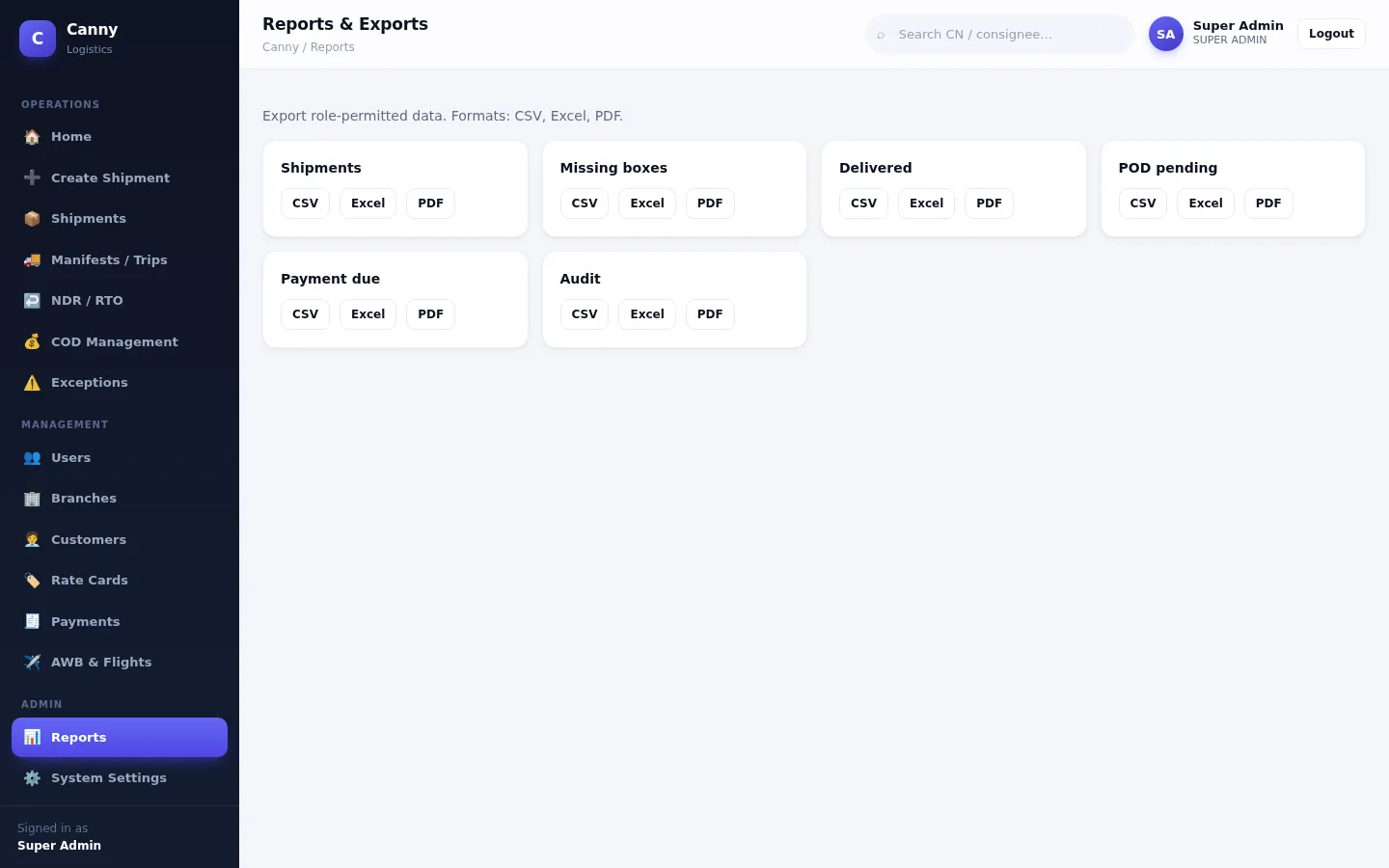
    Dashboard and CSV, Excel or PDF exports

Every stage above works today. Two depend on your setup: invoice extraction is best on text-based PDF invoices, and photos need the server's OCR engine or your Azure account (an operator always checks the result). Box scanning is done with the camera in the Canny Logistics Android app.

Enter it once

Verified invoice data becomes the shipment, the CN, the box labels and the delivery record, with no copying between spreadsheets.

Every box accounted for

Each box has its own QR identity and scan history, so a shipment of 37 boxes is tracked as 37 boxes, not one line.

Evidence on record

Status changes, scans, exceptions, resolutions and proof of delivery are stored with who did what and when.

Features

Everything your operations team handles, in one place

Each feature below exists in the product today. Where something depends on your own accounts or isn't finished yet, we say so.

Available works out of the box Needs your account works once you add credentials In development not ready yet

Capture & create

Available

Shipment management

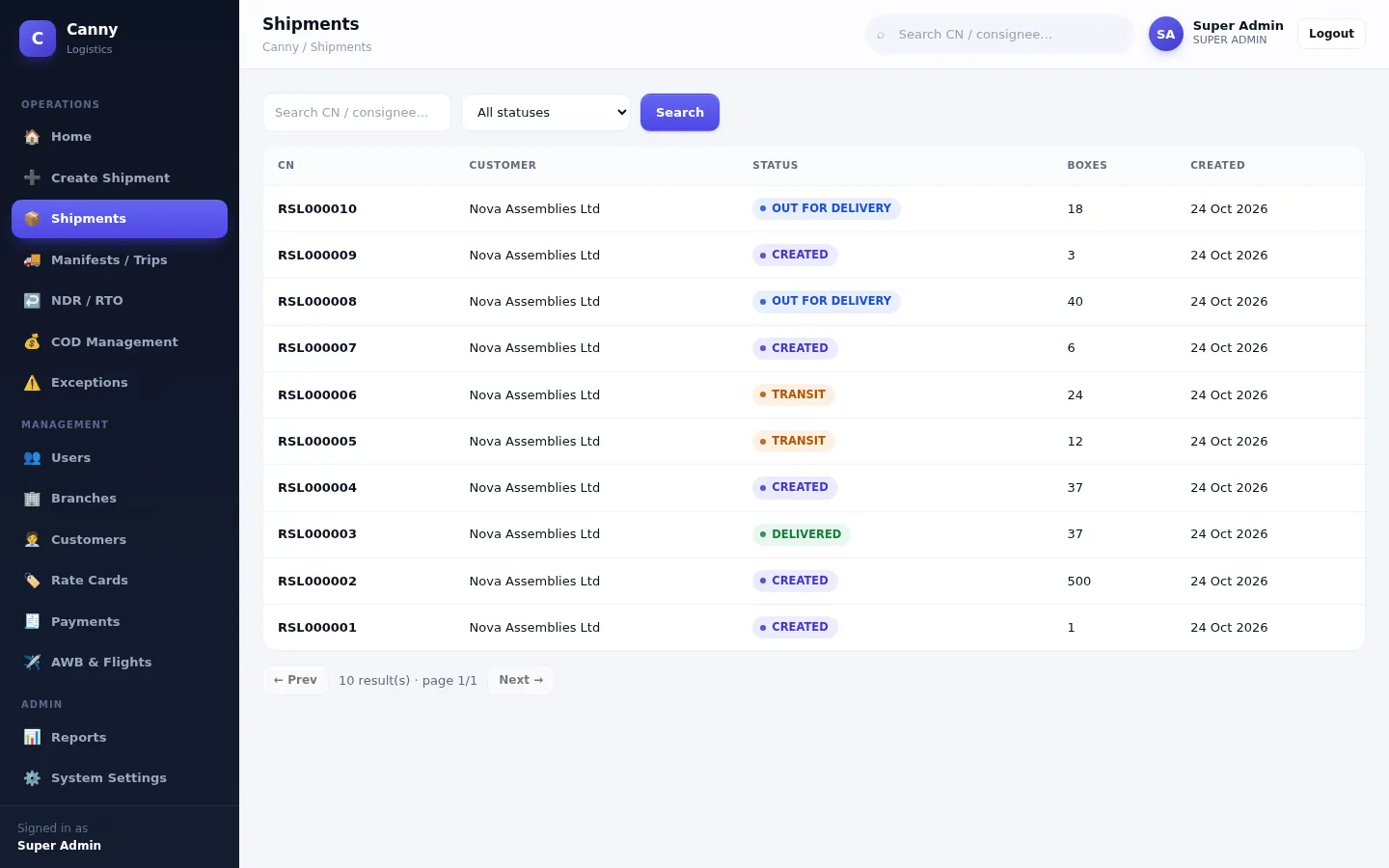
Create shipments with a guided 5-step form or straight from a verified invoice. Search by CN or consignee, filter by status and open the full history.

Why it matters: one place to answer “where is it and what happened?”

See the shipment list
Available

Invoice processing & OCR

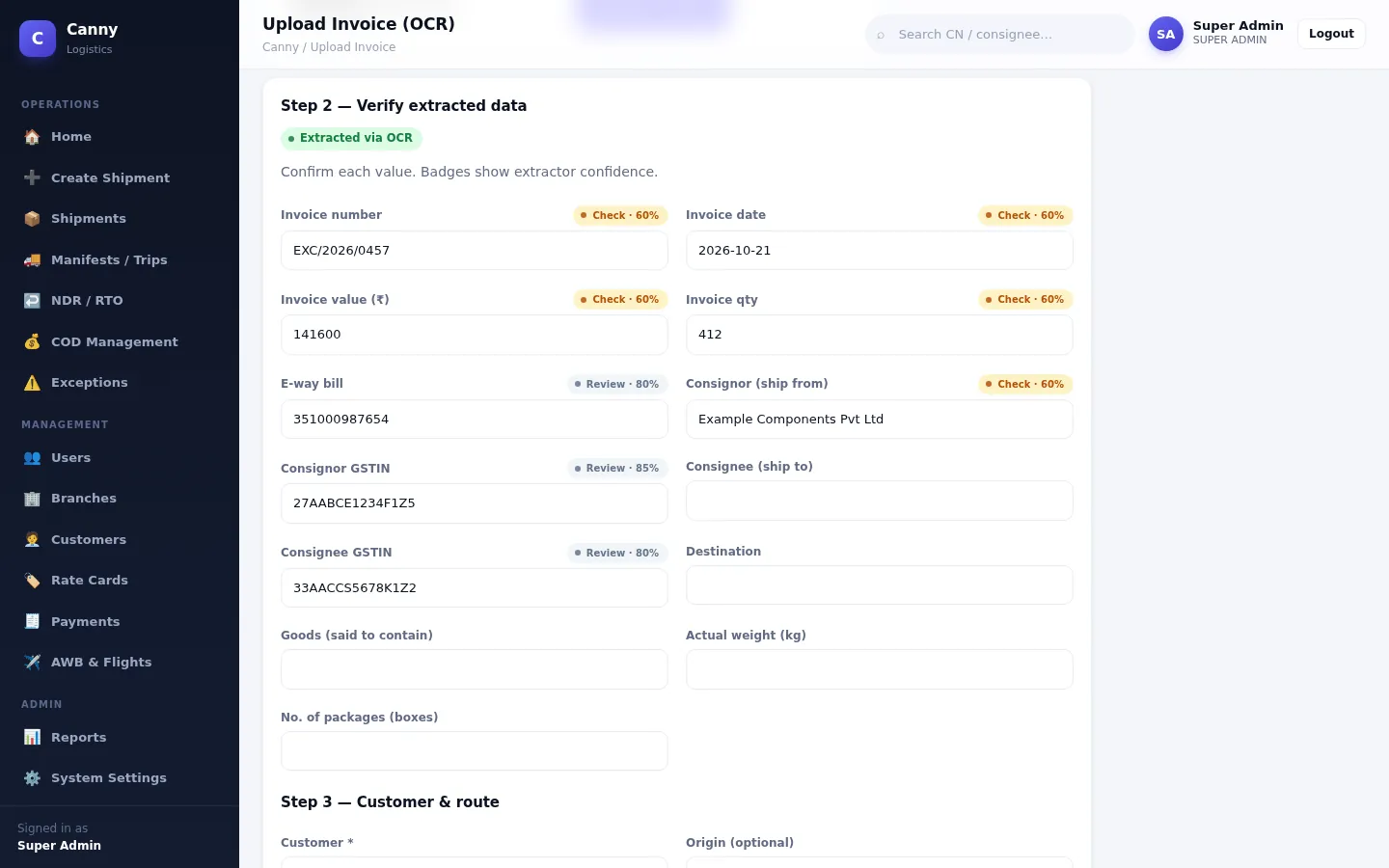
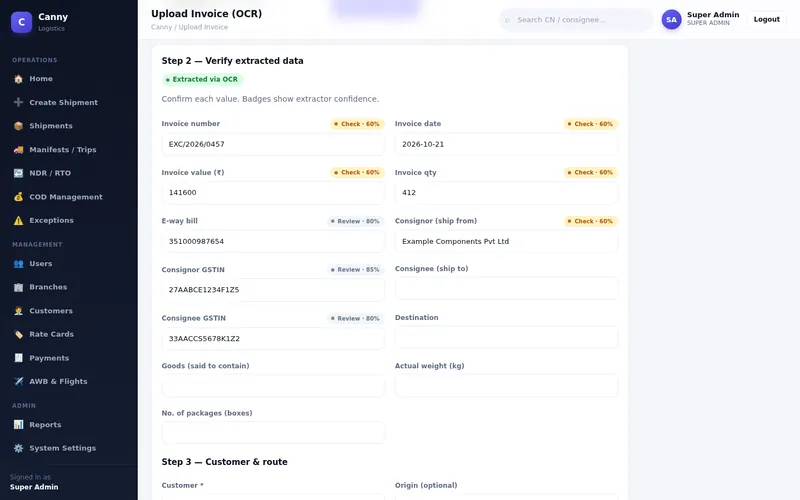
Upload a customer invoice and the system pulls out invoice number, date, value, GSTINs, e-way bill number and more. Confidence badges show what to check, and nothing is saved until an operator verifies it.

Why it matters: less re-typing, with a person still in control.

See invoice verification
Available

QR labels & scanning

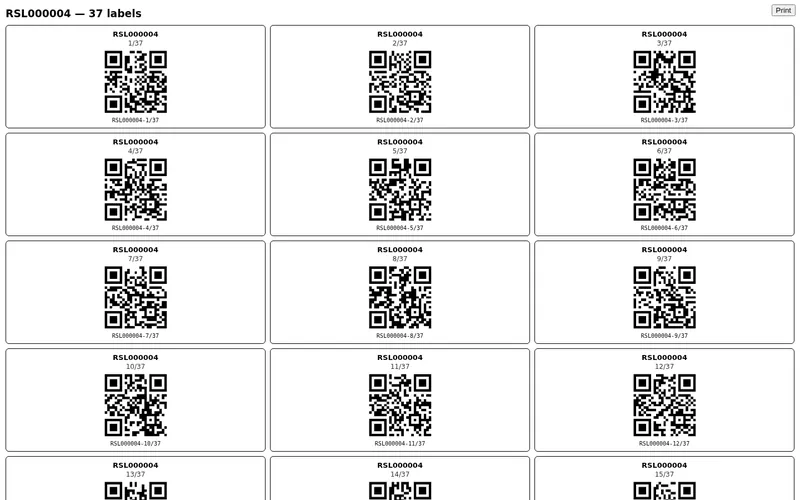
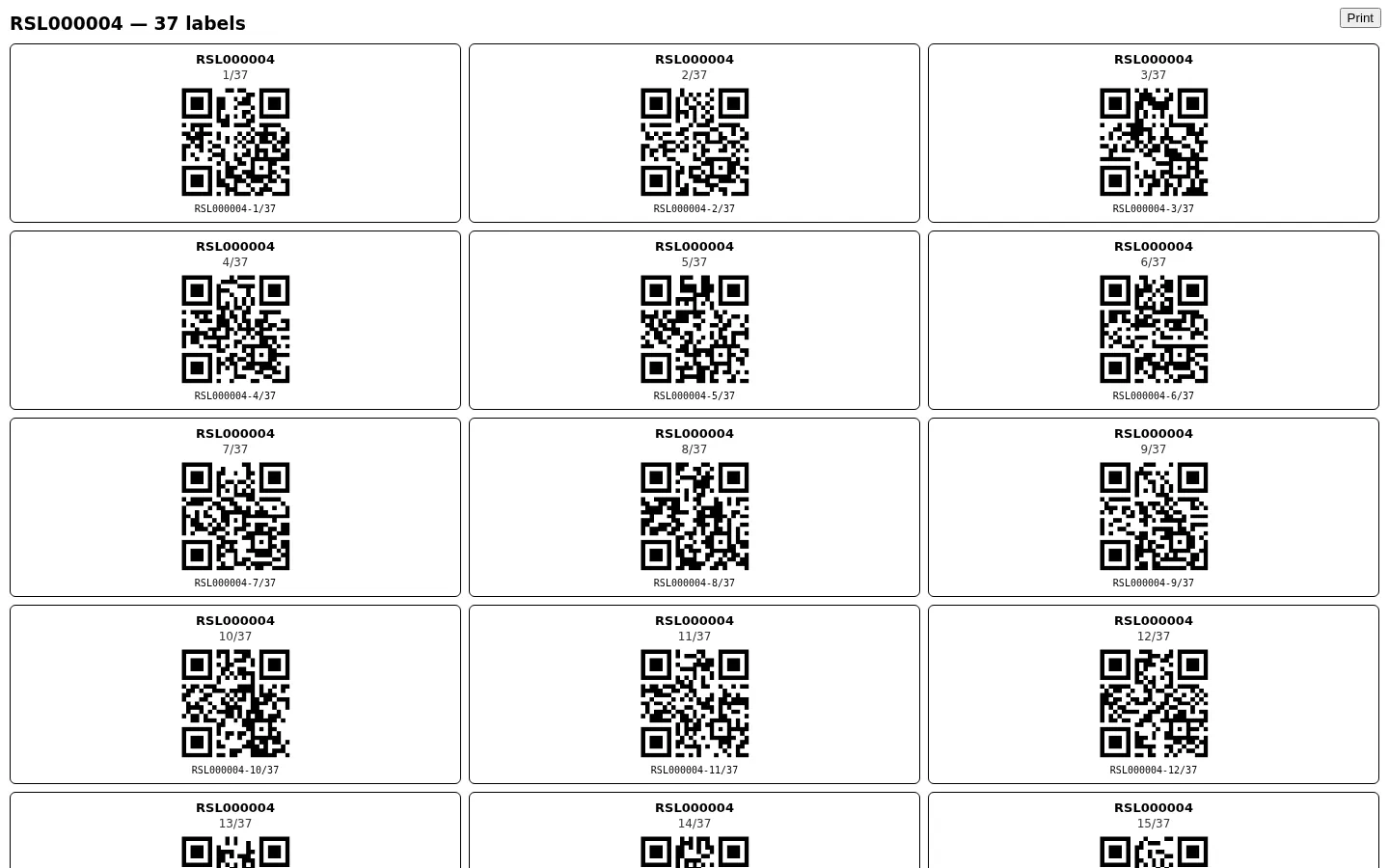
Generate a uniquely numbered QR label for every box in one step, from 1 box to 500+, and print them as a sheet. The Android app scans labels with the phone camera.

Why it matters: labels and scans can't drift out of step with the shipment.

See printed labels
Available

Freight quotes & rate cards

Set up rate cards with per-kg rates, minimum charge, volumetric divisor, fuel surcharge, docket, handling, ODA, FOV and GST. Quote a shipment, apply the charges and raise a freight invoice.

Why it matters: pricing is consistent and every charge can be explained.

Track every box

Available

Package & box tracking

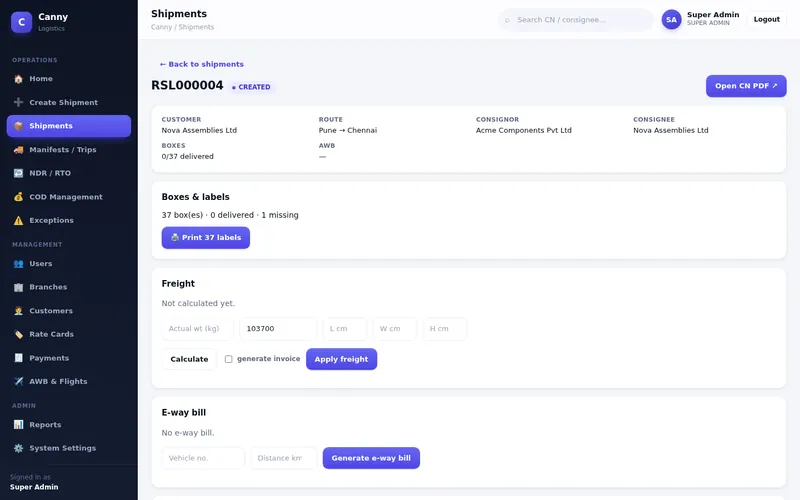
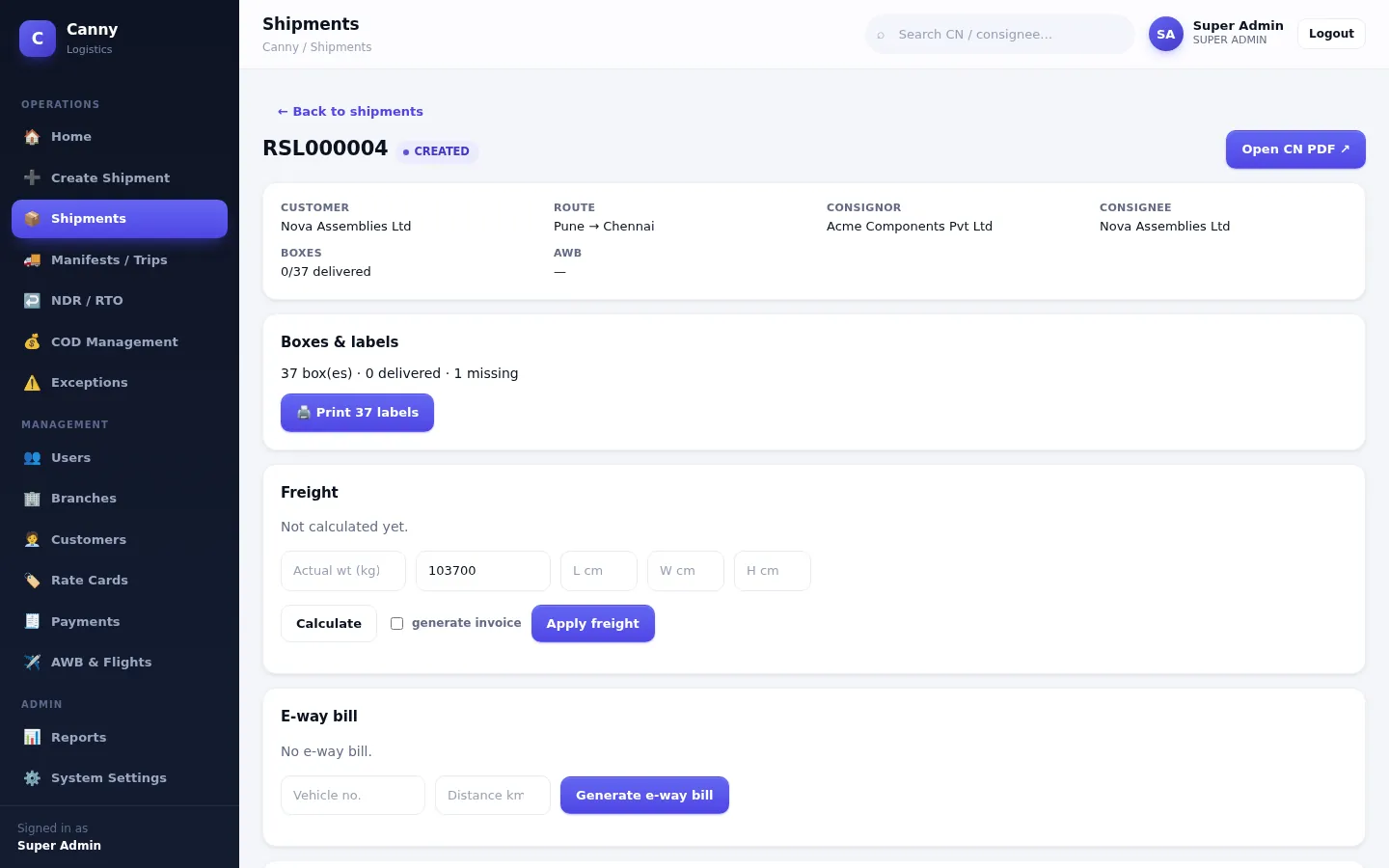
Every box carries its own status and scan history. Scans are checked: unknown labels, boxes from another shipment and repeat scans are flagged right away. The system also compares expected and scanned boxes to find missing ones.

Why it matters: short shipments are spotted before they reach the customer.

See shipment detail
Available

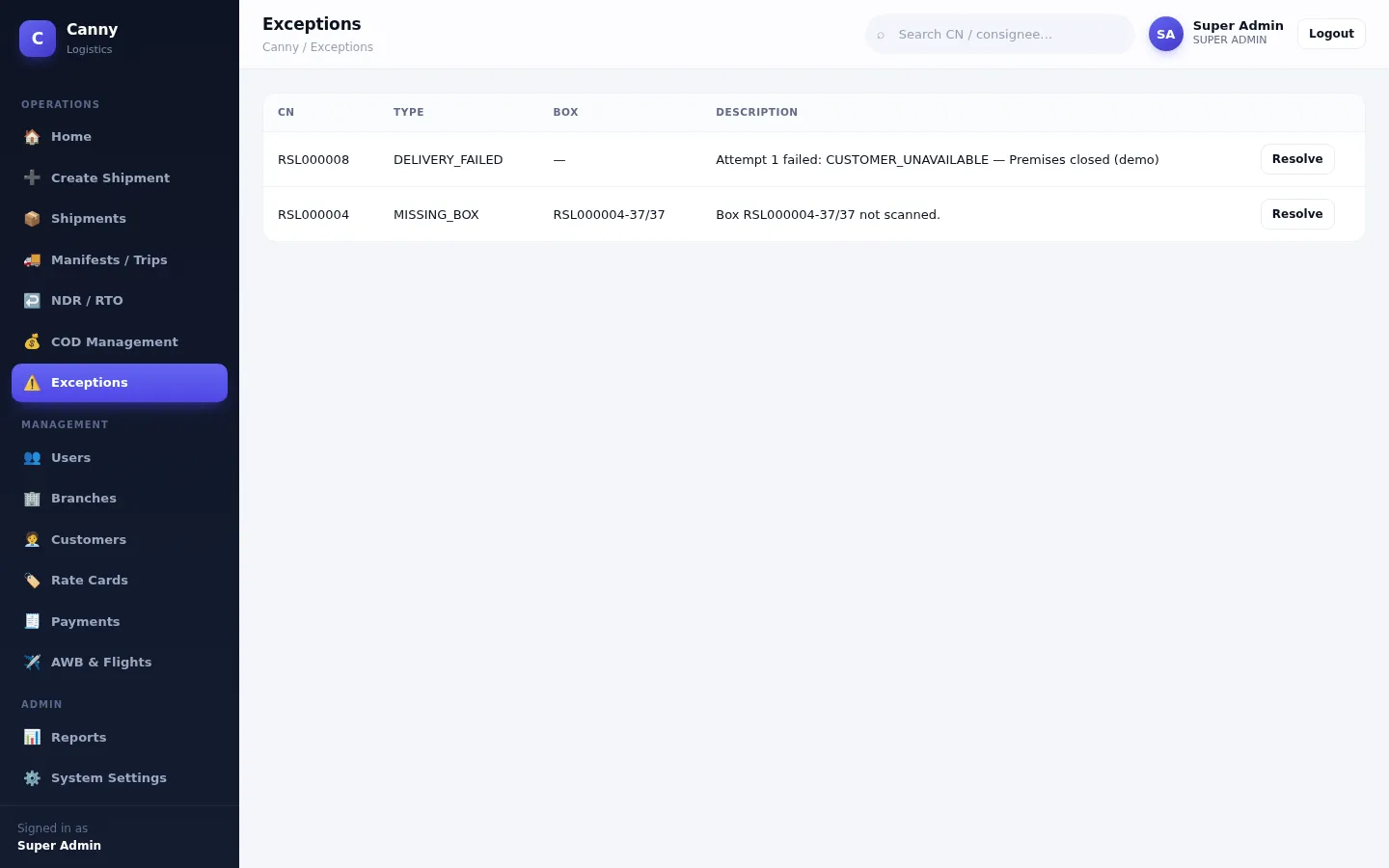
Exception management

Missing boxes and failed deliveries automatically become exceptions. Authorised staff resolve them with a note, and the resolution is kept in the audit trail.

Why it matters: problems get an owner and a recorded outcome.

See exceptions
Available

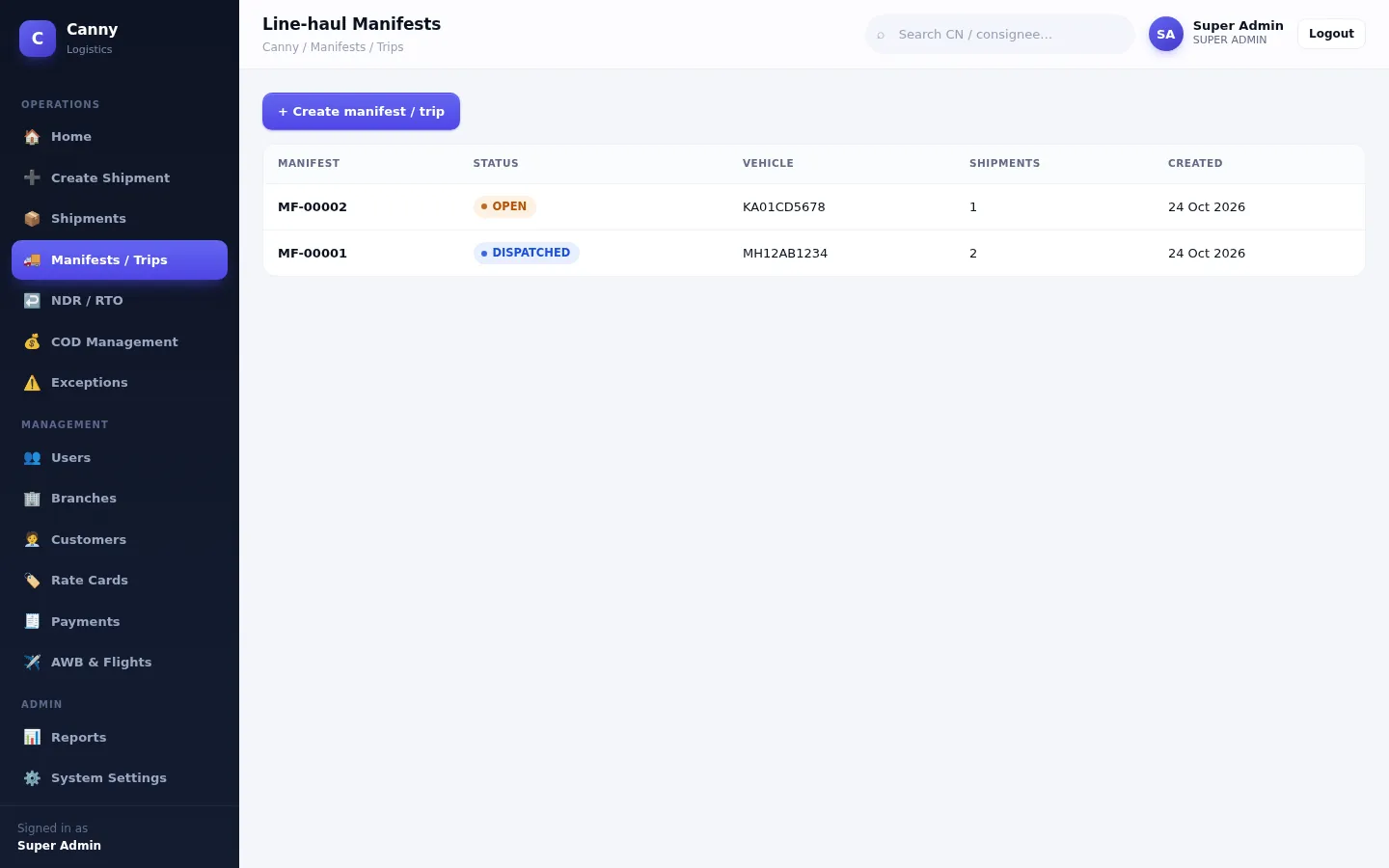
Manifests & dispatch

Group shipments onto a vehicle trip with driver and branch details, then dispatch, mark arrived and close the trip. Dispatching moves shipments to transit for you. Air waybills and flight details can be recorded and linked to shipments by hand.

Why it matters: you know which shipments travelled on which vehicle.

See manifests
Available

Branch & hub operations

Keep a master list of branches and hubs and use them as origin and destination on shipments and trips. Branch-restricted user access isn't available yet; staff see shipments based on their role.

Why it matters: consistent origin and destination data across the network.

Deliver & settle

Available

Delivery management

Move shipments through pickup, transit, out for delivery and delivered, with checks that stop invalid jumps. Delivery staff work from a shared out-for-delivery list in the Android app. Customers can follow progress on a public tracking page.

Why it matters: status is always current and checked.

Available

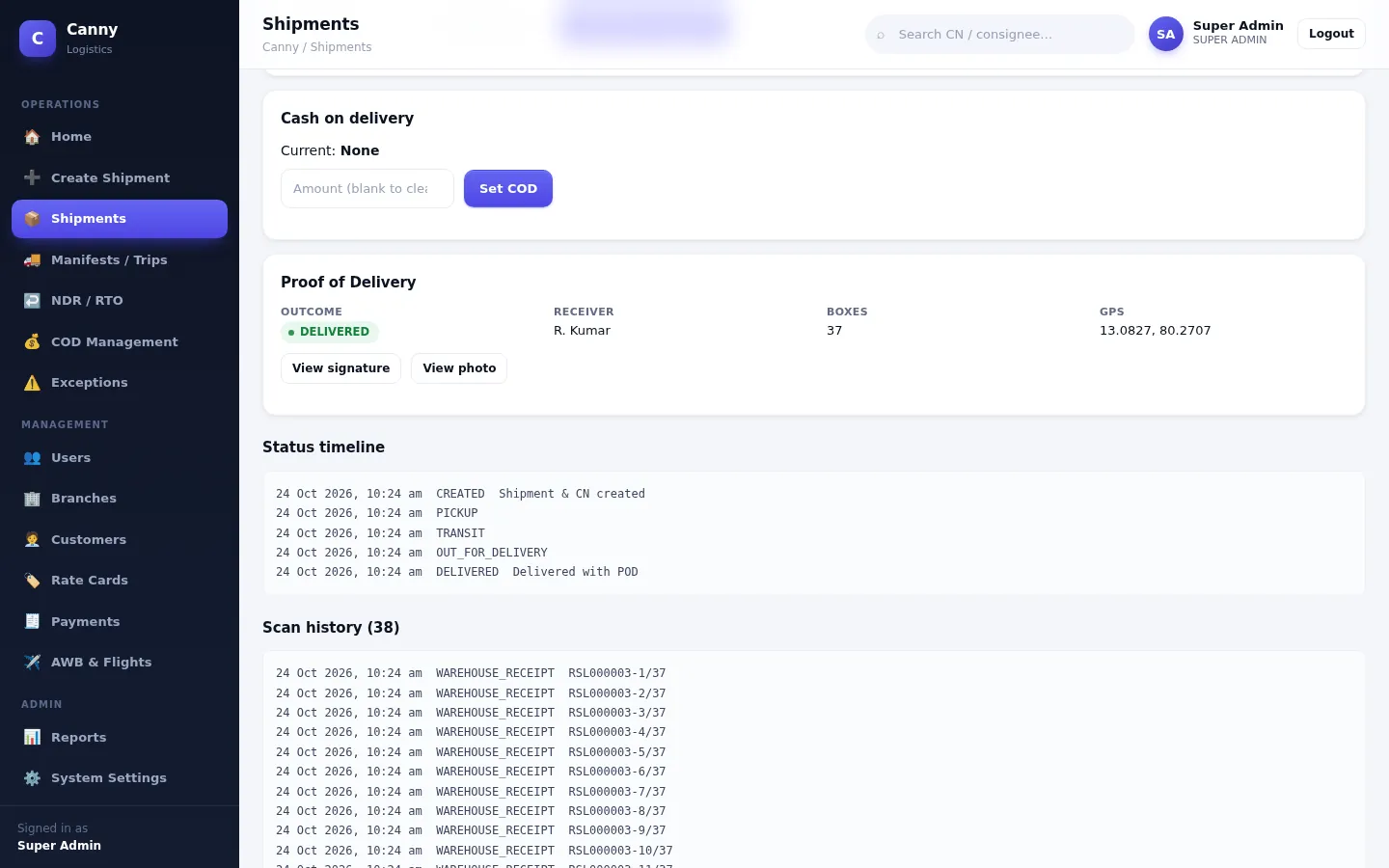
Proof of delivery

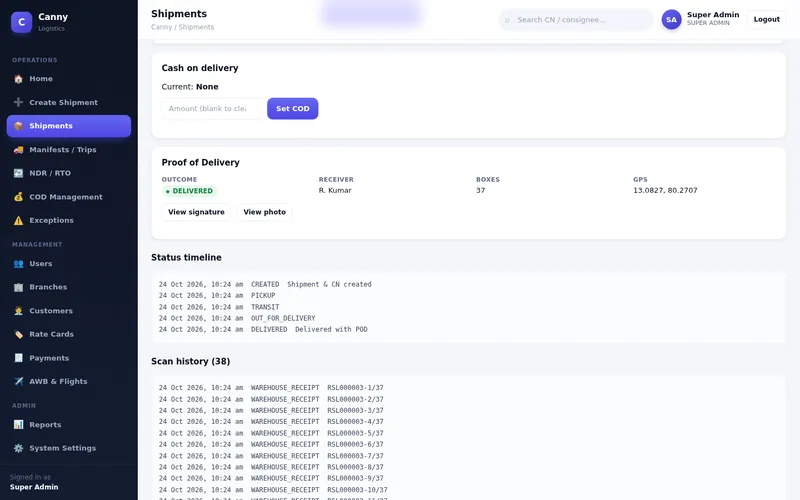
Record the receiver's name, a signature, a photo, GPS location and remarks, from the Android app or the web console. A shipment is marked delivered only after POD is captured. Authorised users can view the evidence later.

Why it matters: delivery disputes have evidence behind them.

See proof of delivery
Available

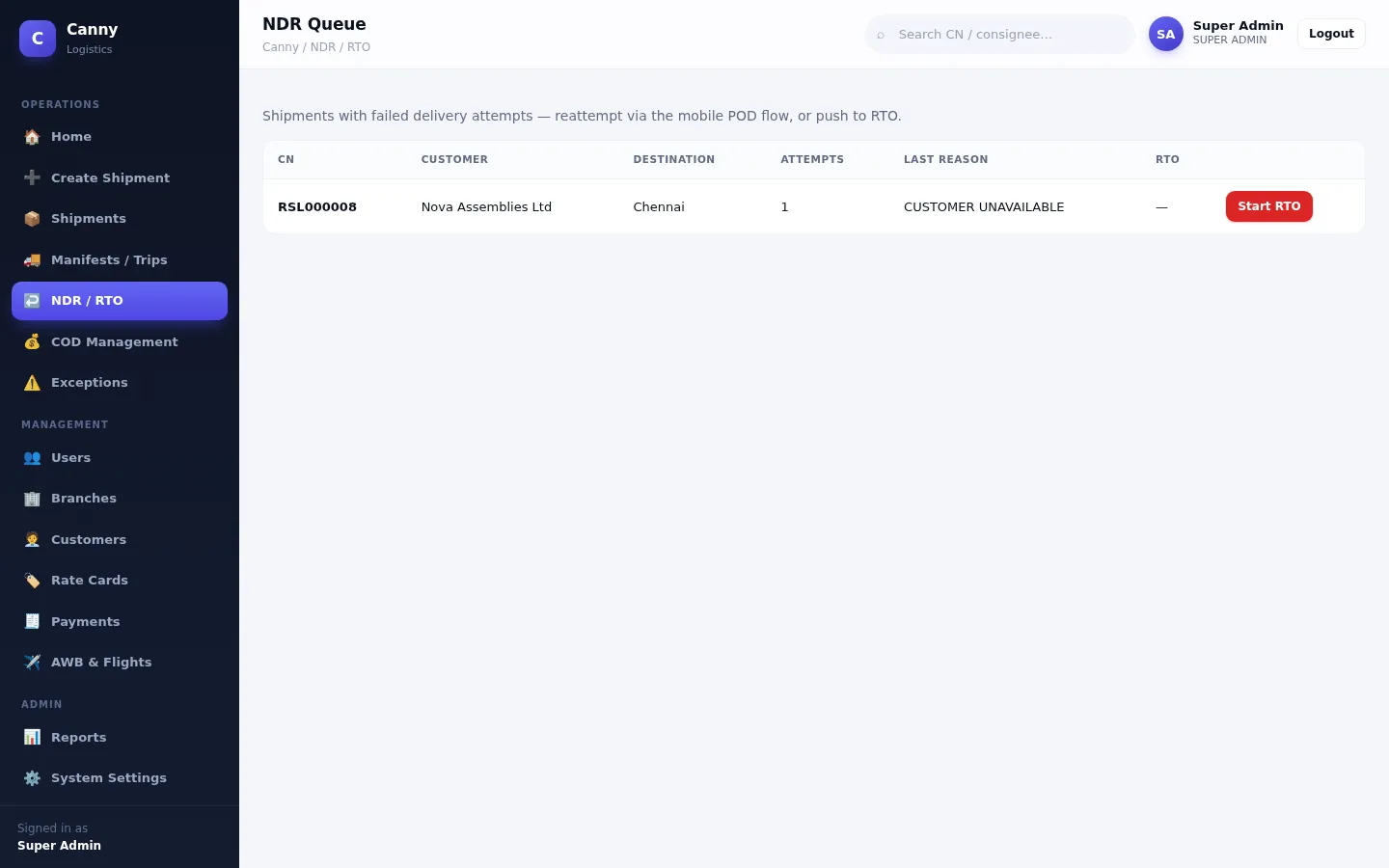
NDR & RTO workflows

A failed attempt is logged with a reason (customer unavailable, address issue, refused, payment issue), and the shipment stays open for another attempt. The NDR queue lists these shipments, and you can start and track a return to origin.

Why it matters: failed deliveries are followed up, not forgotten.

See the NDR queue
Available

COD management

Set a cash-on-delivery amount on a shipment. It's marked collected when proof of delivery is captured, and collected amounts are grouped into remittance batches.

Why it matters: you can see what was collected and what's still to remit. Online payment collection isn't included.

Manage & control

Available

E-way bill records

Keep e-way bill details with each shipment: create a record with validity based on distance, update vehicle (Part-B) details and cancel. Dispatching a trip copies its vehicle onto the e-way record. Filing with the government NIC system isn't connected yet (in development).

Why it matters: e-way information sits with the shipment it covers.

Available

Customers & users

Maintain customer records with GSTIN and contacts. Add staff with one of six roles: Super Admin, Management, Operations, Warehouse, Delivery or Customer. Customer logins only ever see their own shipments.

Why it matters: people see what their job needs, and nothing more.

Available

Reports & analytics

A live dashboard shows totals, in-transit, out-for-delivery, missing boxes and open exceptions, with 7-day activity. Export shipments, missing boxes, delivered, POD pending, payments due and audit reports as CSV, Excel or PDF.

Why it matters: management sees the real numbers without asking for a spreadsheet.

See reports
Available

Audit logs & administration

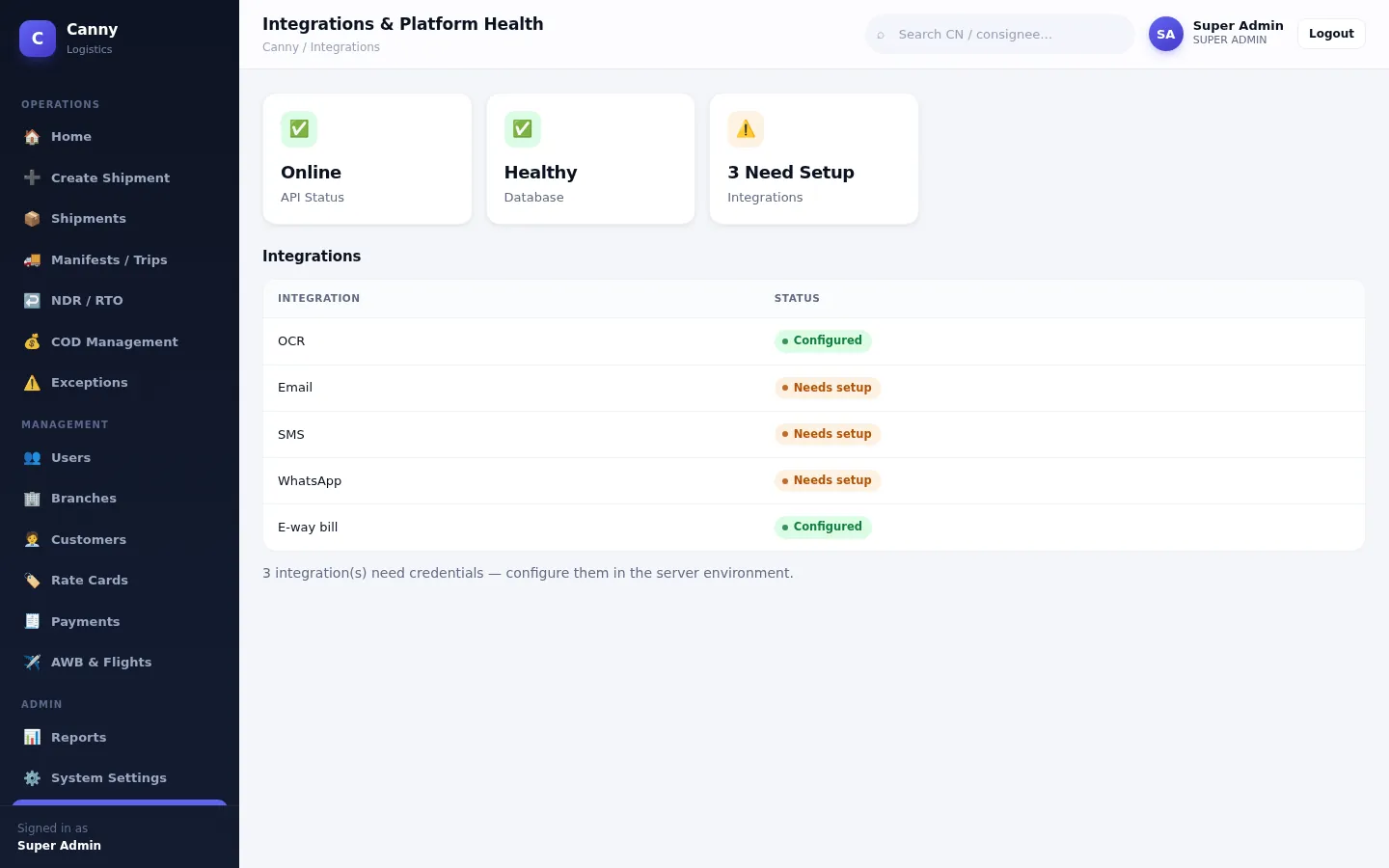
Key actions are written to an audit log that admins can review. System settings cover CN numbering. Service invoices with payment reminders and an integrations health page are also included.

Why it matters: you can always see who changed what.

See administration
Want to see these features with your own shipment types?Book a walkthrough built around your workflow.
Request a demo

How it works

Five simple steps from paperwork to delivered

This is how a typical shipment moves through Canny Logistics. There's no special hardware to buy: a computer, a printer for labels and an Android phone for scanning are enough.

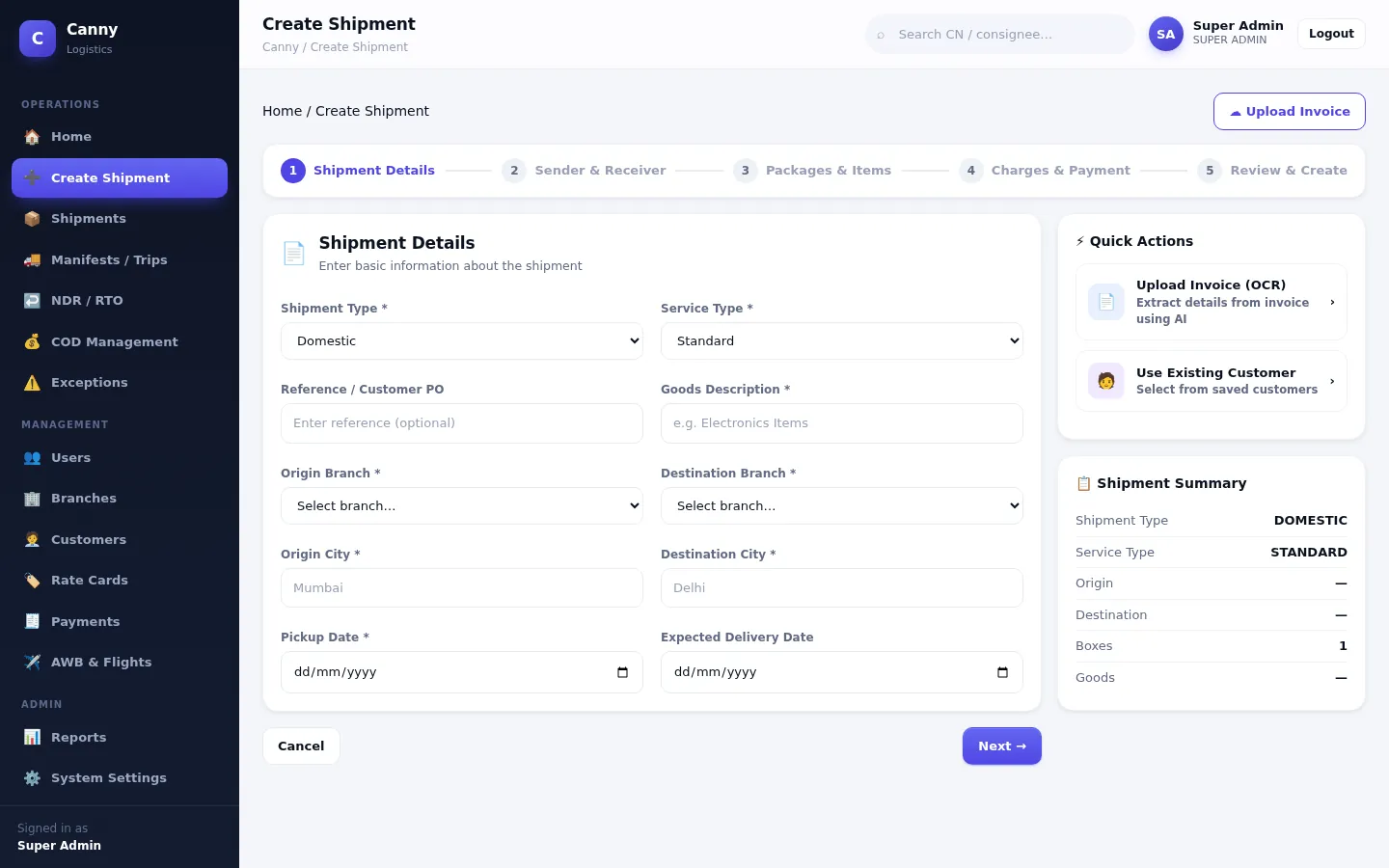
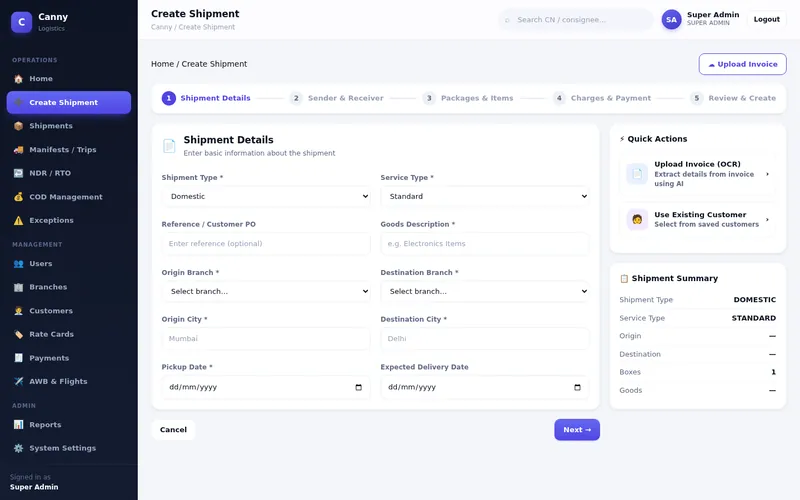
  1. Upload or enter shipment details

    Upload the customer's invoice (PDF or photo), or fill in the 5-step shipment form by hand.

    Manual entry is always available.

    Create Shipment form, step 1 of 5: shipment and service type, branches, cities and dates
  2. Verify the information

    Check the extracted fields side by side. Confidence badges point out anything that needs a second look.

    Nothing moves on until a person confirms it.

    Verify extracted data screen with invoice fields and confidence badges
  3. Create the shipment and labels

    A unique CN/GCN number and a printable CN PDF are created. Generate the boxes and print one QR label for each.

    Labels print on a normal printer as a sheet.

    Printable sheet of QR box labels, each showing CN number, box sequence and box code
  4. Scan, track and manage movement

    Scan boxes with the Android app as they move through pickup, transit and out for delivery. Missing or wrong boxes are flagged.

    Scanning uses the phone camera in the Android app.

    Shipment detail showing 37 boxes with one missing, plus freight and e-way bill panels
  5. Confirm delivery and review

    Capture proof of delivery, follow up failed attempts and exceptions, and review the dashboard and reports.

    A shipment is marked delivered only with POD.

    Proof of delivery panel showing outcome delivered, receiver, box count and GPS, with the status timeline

Product tour

See the real interface

These are screenshots of the Canny Logistics Operations Console. They use demo data, not customer data.

Home dashboard with quick actions, system overview counts, items needing attention and shipment activity chart

Home dashboard

Quick actions for your role, today's totals, what needs attention and recent admin activity, all calculated from live data.

  • Shipments, delivered, in transit, out for delivery
  • Missing boxes and open exceptions
  • 7-day activity chart
Prefer a live walkthrough? We'll show the console and the Android app together. Request a demo

Benefits

What changes for your team

How much time you save depends on your volumes and processes, so we don't quote numbers. Here's where the platform helps, and which feature does the work.

Less repetitive data entry

Invoice details are extracted once and reused for the CN, labels and delivery record.

Invoice processing & OCR · Shipment creation

Better shipment and box visibility

See status at shipment level and at box level, with a scan history for each box.

QR labels · Box tracking · Dashboard

Organised operational information

Customers, branches, rate cards, trips and documents are linked to the shipments they relate to.

Customers · Branches · Manifests

Problems spotted earlier

Wrong-shipment scans, missing boxes and failed deliveries are flagged as they happen.

Scan validation · Exceptions · NDR queue

Stronger delivery documentation

Receiver, signature, photo and GPS are stored with the shipment and kept access-controlled.

Proof of delivery

Records that are easy to find

Search by CN or consignee and open the CN PDF, timeline and evidence in a couple of clicks.

Shipment search · Shipment detail

Smoother coordination between teams

Operations, warehouse, delivery and management each see the same record through their own role.

Roles & permissions · Android app

Better reporting and oversight

Live dashboard figures, exportable reports and an audit log of key actions.

Reports · Audit log

Solutions

Built for teams that move goods every day

Canny Logistics fits businesses whose daily work is booking, labelling, moving and delivering consignments.

Logistics & transport operators

Book consignments from customer invoices, plan line-haul trips and keep e-way bill details with each load.

  • CN/GCN with PDF
  • Manifests & dispatch
  • Freight rate cards

Courier & parcel businesses

Track each parcel from pickup to doorstep, with failed attempts, returns and COD handled in the same system.

  • Proof of delivery
  • NDR & RTO
  • COD remittance

Distribution companies

Ship to many consignees from several branches and give management one view of what went out and what arrived.

  • Branch master data
  • Dashboard & reports
  • Customer records with GSTIN

Multi-package shipments

When one consignment is 37 or 500 boxes, every box gets its own label and is checked at every stage.

  • Bulk box & label generation
  • Missing-box detection
  • Box-level delivery counts

High-frequency delivery teams

Give delivery staff a simple phone app and give the office live status without phone calls.

  • Android app for delivery staff
  • Camera scanning
  • Public tracking page

Documentation-heavy operations

When customers expect paperwork and evidence, keep invoices, CNs and POD together and access-controlled.

  • Stored source invoices
  • Signature, photo & GPS
  • Audit log

What Canny Logistics doesn't do today: route optimisation, fleet telematics or GPS vehicle tracking, warehouse inventory management (WMS), per-driver delivery assignment, online payment collection, and live airline or courier-partner APIs. If you need any of these, tell us in your demo request and we'll be straight about what's possible.

Access anywhere

Office, warehouse or doorstep

The Operations Console runs in a web browser, so there's nothing to install on office computers. Field teams use the Android app.

Desktop browser

The full Operations Console in a current version of Chrome, Edge, Firefox or Safari.

Available

Tablet & phone browser

The console adapts to tablets and phones with a collapsible menu. On iPhone and iPad, use Safari and Add to Home Screen for a one-tap shortcut. There's no native iOS app.

Available

Android app

For operations, delivery and customer users: camera scanning, invoice photos, and POD with signature, photo and GPS. We provide it as an installable app during onboarding; it isn't on Google Play.

Available on request

Public tracking page

Your customers can track a consignment by CN number without logging in. It shows status, box counts and approved remarks only.

Integrations

Connections, and exactly where each one stands

Integrations are switched on through server configuration. The console's Platform Health page shows which ones are configured.

OCR & document processing

  • Built-in extraction for text-based PDF invoicesAvailable
  • Photo / scan OCR with e-invoice QR reading, on your serverServer setup
  • Azure AI Document IntelligenceNeeds your account

Notifications

  • In-app notificationsAvailable
  • Email via ResendNeeds your account
  • SMS via TwilioNeeds your account
  • WhatsApp via Meta Cloud API or TwilioNeeds your account
  • Email via your own SMTP serverIn development

Email needs a verified sending domain; WhatsApp needs approved message templates.

E-way bill

  • E-way records with validity, Part-B and cancelAvailable
  • Live filing with NIC through a GSPIn development

Live NIC filing will need your GST Suvidha Provider (GSP) account.

File storage

  • Private storage on the application serverAvailable
  • Cloud object storage (S3 / Azure Blob)In development

Other business systems

  • REST API used by the console and Android appAvailable
  • Ready-made ERP / accounting connectorsNot supported
  • Airline or courier-partner APIsNot supported

Air waybill and flight details are entered manually.

Payments & COD

  • COD tracking and remittance batchesAvailable
  • Service invoices & payment remindersAvailable
  • Online payment gatewayNot supported

Security & access control

Your operational data, kept to the right people

These controls are built into the platform and covered by its automated tests.

Secure sign-in

Passwords are stored as one-way hashes (bcrypt). Sign-in sessions use signed tokens that expire, by default after 12 hours.

Role-based permissions

Six roles with a permission list for each, checked on the server for every request, not just hidden in the interface.

Customer isolation

Customer logins can only reach their own shipments, invoices and notifications. Requests for anyone else's data return “not found”.

Protected documents

Invoices and POD signatures and photos are stored privately and served only through permission-checked endpoints.

Safe public surfaces

QR labels carry an opaque code, not customer details. Public tracking shows limited fields and is rate-limited.

Audit trail & backups

Key actions are recorded in an audit log. A backup script for scheduled database and file backups is included; the schedule is set up per deployment.

We don't claim third-party security certifications. Ask us about hosting, data location and backup arrangements during your demo.

Resources

Frequently asked questions

Request a demo

See Canny Logistics with your own workflow

Tell us a little about your operation. We'll walk you through the features that matter to you, and be clear about what fits and what doesn't.

  1. We review your requestYour details go straight to our team. Nothing is shared with third parties for marketing.
  2. We contact youBy email, phone or WhatsApp, whichever you prefer, to agree a time.
  3. A walkthrough built around youWe show the console and Android app using shipment types like yours.

Fields marked with an asterisk are required.

Include the country code if outside India.

Features you're interested in(optional)

Preferred contact method

We only use these details to respond to your request.

Ready to simplify your logistics operations?

See how Canny Logistics can help your team organise shipments, track packages, manage delivery workflows and improve operational visibility.

Request a demo Sign in